
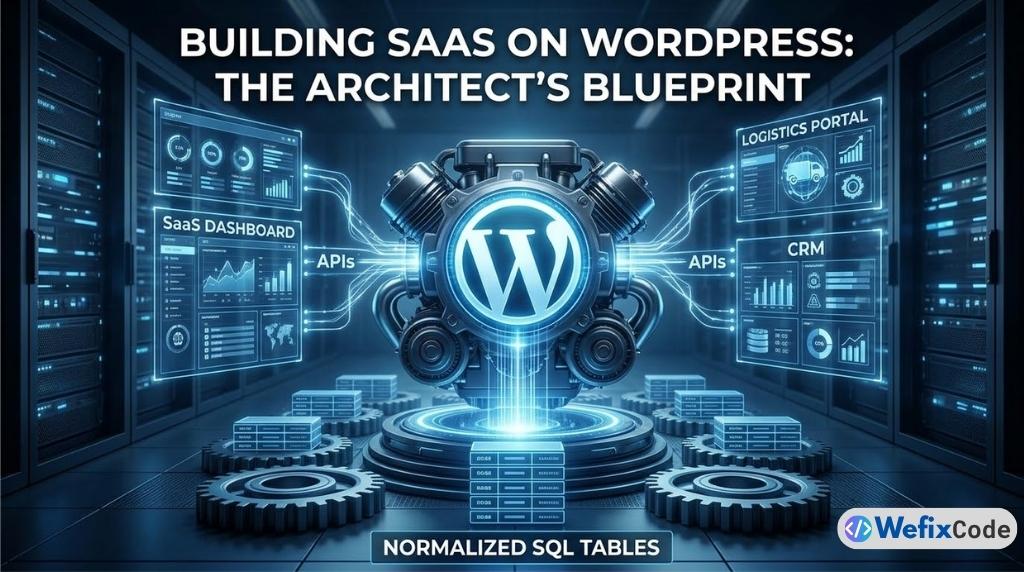
If you tell a room full of software engineers that you are building a complex Web Application or a SaaS (Software as a Service) product on WordPress, you will likely be met with skepticism.
“WordPress is just a blogging platform,” they will say. “It’s too slow. It’s not secure. The database architecture doesn’t scale.”
If you build an application the way a junior developer builds a website—by stacking 40 plugins, using Elementor for the application dashboard, and stuffing 100,000 rows of user data into the wp_postmeta table—they are absolutely right. The system will collapse under its own weight within months.
However, beneath the themes and plugins, WordPress is a mature, battle-tested PHP framework. It comes with a built-in user authentication system, a robust REST API, an ORM (Object-Relational Mapping) wrapper for database queries, and a massive ecosystem of integrations.
As Senior Developers, our job is not to use WordPress out-of-the-box. Our job is to strip away the frontend bloat and utilize the WordPress Core as a powerful backend engine.
Whether you are building a custom CRM, an inventory tracker, or a complex Tariff and Logistics Management System, this guide serves as the definitive architectural blueprint for scaling WordPress from a simple website into a high-performance web application.
Phase 1: Database Architecture (Escaping the EAV Trap)
The single biggest reason WordPress applications fail at scale is the database architecture.
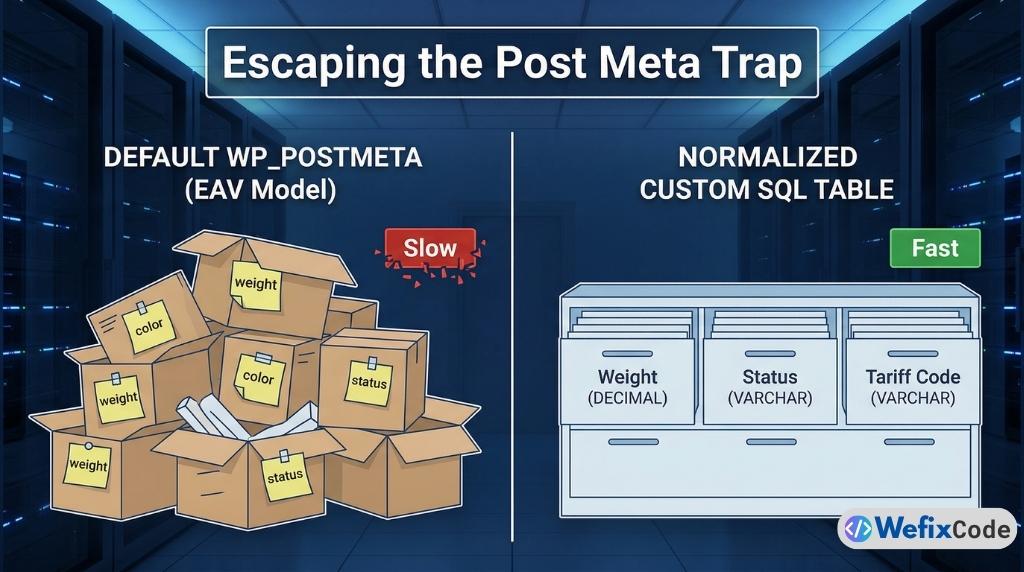
By default, WordPress uses an Entity-Attribute-Value (EAV) model for its data. If you create a Custom Post Type for “Shipments,” every single attribute of that shipment—the weight, the destination, the tariff code, the current status—gets saved as a separate row in the wp_postmeta table.
The Problem with Post Meta in Applications
Imagine a logistics application where a user wants to filter a list of shipments. They want to see all shipments that are “In Transit” (Status), weighing over “500kg” (Weight), destined for “Bangkok” (Location).
To run this query using WordPress’s default WP_Query, the database must perform a SQL JOIN on the wp_postmeta table three separate times for every single post. If you have 10,000 shipments, the server is cross-referencing 30,000 rows in memory. The query will take 4 to 5 seconds. In a web application, anything over 0.5 seconds is considered a failure.
The Solution: Normalized Custom SQL Tables
As we discussed in our previous guide on [Creating Custom Database Tables in WordPress], serious web applications require normalized, horizontal data storage.
Instead of relying on Custom Post Types for your core application data, you must write raw SQL schemas using dbDelta().
Let’s look at how a Senior Developer architects the database for a Logistics System. We create a dedicated table where every attribute is a column with a strict data type.
function wfc_create_logistics_tables() {
    global $wpdb;
    $charset_collate = $wpdb->get_charset_collate();
    $table_name = $wpdb->prefix . 'wfc_shipments';

    $sql = "CREATE TABLE $table_name (
        id bigint(20) NOT NULL AUTO_INCREMENT,
        user_id bigint(20) NOT NULL,
        tracking_number varchar(100) NOT NULL,
        origin varchar(255) NOT NULL,
        destination varchar(255) NOT NULL,
        weight_kg decimal(10,2) NOT NULL,
        tariff_code varchar(50) NOT NULL,
        status varchar(50) DEFAULT 'pending' NOT NULL,
        created_at datetime DEFAULT CURRENT_TIMESTAMP NOT NULL,
        updated_at datetime DEFAULT CURRENT_TIMESTAMP ON UPDATE CURRENT_TIMESTAMP NOT NULL,
        PRIMARY KEY  (id),
        KEY user_id (user_id),
        KEY tracking_number (tracking_number),
        KEY status (status)
    ) $charset_collate;";

    require_once( ABSPATH . 'wp-admin/includes/upgrade.php' );
    dbDelta( $sql );
}
register_activation_hook( __FILE__, 'wfc_create_logistics_tables' );
Architectural Breakdown:
- Strict Data Types: Notice
weight_kgis set todecimal(10,2). Inwp_postmeta, this would be saved as a string (text). By defining it as a decimal at the server level, we can run instant mathematical queries likeSELECT SUM(weight_kg). - Indexing: We added
KEY status (status). This creates an index in the MySQL database. When the user filters for “pending” shipments, the database doesn’t have to scan the whole table; it knows exactly where they are. Query time drops from 5 seconds to 0.01 seconds. - Timestamps: Using
ON UPDATE CURRENT_TIMESTAMPpushes the burden of tracking data changes to the database itself, saving PHP processing power.
By migrating your core application data to custom tables, you bypass the WordPress bottlenecks entirely, allowing your SaaS to scale to millions of rows seamlessly.
Phase 2: The REST API (Building the Bridge)
Once your data is safely structured in custom SQL tables, how do you get it out?
In a traditional WordPress site, you would use PHP templates (archive.php, single.php) to render the data directly onto the server. But modern web applications do not work this way. Modern applications decouple the backend from the frontend.
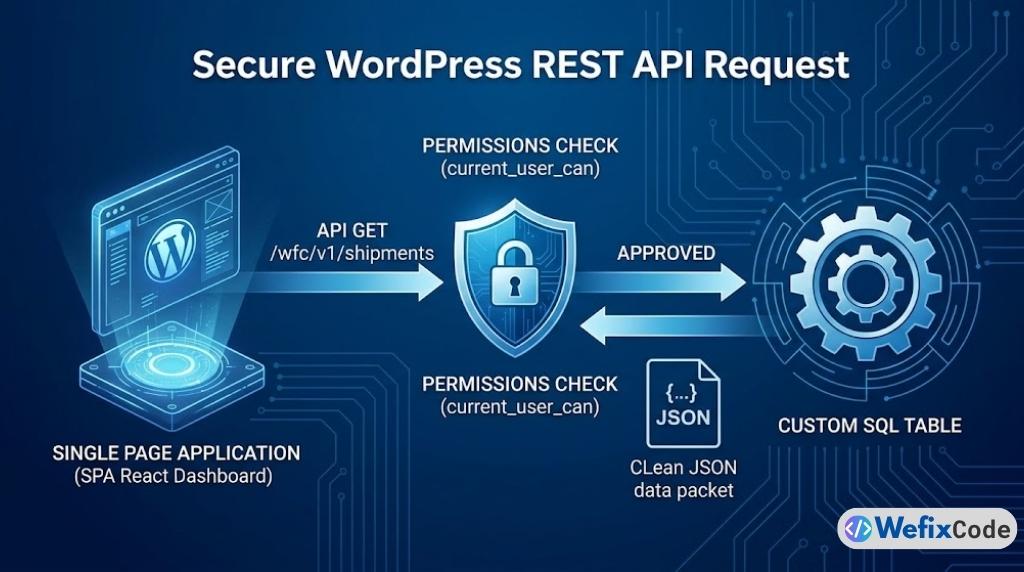
To build a fast, reactive application dashboard, you must build an API. The WordPress REST API allows your backend to act purely as a data server, returning JSON data to whichever frontend framework you choose to use.
Registering Custom Endpoints
You should never use the default /wp/v2/posts endpoints for sensitive application data. You must build your own custom, versioned API routes.
Here is how we expose our logistics data securely:
add_action( 'rest_api_init', 'wfc_register_logistics_endpoints' );

function wfc_register_logistics_endpoints() {
    // Endpoint to GET user shipments
    register_rest_route( 'wfc/v1', '/shipments', array(
        'methods'             => WP_REST_Server::READABLE,
        'callback'            => 'wfc_get_user_shipments',
        'permission_callback' => 'wfc_check_api_permissions',
    ));

    // Endpoint to POST (create) a new shipment
    register_rest_route( 'wfc/v1', '/shipments', array(
        'methods'             => WP_REST_Server::CREATABLE,
        'callback'            => 'wfc_create_shipment',
        'permission_callback' => 'wfc_check_api_permissions',
        'args'                => wfc_get_shipment_args()
    ));
}
The Permission Callback: Security by Design
The permission_callback is the most critical part of this architecture. If you fail to implement this correctly, anyone on the internet can query your database.
Unlike a blog where posts are public, web application data is highly sensitive. Your API must verify who is asking for the data before it touches the database.
function wfc_check_api_permissions( WP_REST_Request $request ) {
    // 1. Is the user logged in?
    if ( ! is_user_logged_in() ) {
        return new WP_Error( 'rest_forbidden', 'You must be logged in to view shipments.', array( 'status' => 401 ) );
    }

    // 2. Does the user have the application capability?
    if ( ! current_user_can( 'manage_logistics' ) ) {
        return new WP_Error( 'rest_unauthorized', 'You do not have permission to access this system.', array( 'status' => 403 ) );
    }

    return true;
}
The Callback: Sanitization and Response
When the API route is triggered, your callback function must fetch the data from your custom table, format it, and return it.
function wfc_get_user_shipments( WP_REST_Request $request ) {
    global $wpdb;
    $table_name = $wpdb->prefix . 'wfc_shipments';
    $user_id    = get_current_user_id();

    // Safely query the custom table
    $query = $wpdb->prepare(
        "SELECT tracking_number, origin, destination, status FROM $table_name WHERE user_id = %d ORDER BY created_at DESC LIMIT 50",
        $user_id
    );

    $results = $wpdb->get_results( $query, ARRAY_A );

    if ( empty( $results ) ) {
        return rest_ensure_response( array() ); // Return empty array, not a 404
    }

    // Always use rest_ensure_response to format the JSON properly
    return rest_ensure_response( $results );
}
By building a strict, heavily guarded REST API, your WordPress installation is no longer a website. It is a headless data engine.
Phase 3: Granular Access Control (Roles & Capabilities)
A web application is defined by its users. In a standard website, you have Subscribers, Authors, and Administrators. In a SaaS application, you have complex hierarchies: Account Owners, Billing Managers, Staff, and Read-Only Clients.
Relying on default WordPress roles is a massive security vulnerability. If you give a user “Editor” access just so they can upload files, they suddenly have access to your marketing pages.
Defining Application-Specific Roles
When architecting an application, you must define custom roles that are entirely isolated from the CMS (Content Management System) side of WordPress.
We do this on plugin activation:
function wfc_setup_application_roles() {
    // Create a Client Role
    add_role(
        'wfc_client',
        'Logistics Client',
        array(
            'read'             => true, // Can read standard front-end
            'manage_logistics' => true, // Custom App Capability
            'create_shipments' => true, // Custom App Capability
            'delete_shipments' => false, // Cannot delete
            'edit_posts'       => false, // Completely isolated from WP Blog
        )
    );

    // Create a Staff/Manager Role
    add_role(
        'wfc_staff',
        'Logistics Manager',
        array(
            'read'             => true,
            'manage_logistics' => true,
            'create_shipments' => true,
            'delete_shipments' => true,
            'manage_tariffs'   => true, // Higher level capability
            'edit_posts'       => false,
        )
    );
}
Capability Checking (The Zero-Trust Model)
Throughout your application code—whether in your API callbacks, your frontend dashboard, or your form submissions—you must never check a user’s Role. You must only check their Capabilities.
Wrong Way: if ( $user->roles[0] == 'wfc_staff' ) { ... }
Right Way: if ( current_user_can( 'manage_tariffs' ) ) { ... }
Roles can be changed or renamed. Capabilities are absolute. By utilizing current_user_can(), you leverage WordPress’s deeply integrated permissions matrix, which is arguably one of the most secure and battle-tested access control systems in the PHP ecosystem.
Phase 4: Frontend Architecture (The Decoupled Dashboard)
This is where the user experience of your application is made or broken.
If you attempt to build a complex SaaS dashboard using Elementor or standard WordPress theme templates, the experience will feel sluggish. Every time the user clicks a tab, the entire page has to reload. If they submit a complex form, the screen goes blank while the server processes it.
The SPA (Single Page Application) Approach
To provide a modern, “App-like” experience, the frontend should be built as a Single Page Application using JavaScript frameworks like React.js or Vue.js.
You do not need to host this separately on Vercel or Netlify (though you can). You can enqueue a React application directly inside a WordPress page template.
The Architecture:
- Create a blank WordPress page template (e.g.,
app-dashboard.php). - Enqueue your compiled React JavaScript file on this specific page.
- Use
wp_localize_script()to pass the WordPress REST API URL and the Nonce (Security Token) into your JavaScript application.
function wfc_enqueue_app_scripts() {
    if ( is_page( 'dashboard' ) ) {
        wp_enqueue_script(
            'wfc-react-app',
            plugins_url( '/build/index.js', __FILE__ ),
            array( 'wp-element' ), // WP's wrapper for React
            '1.0.0',
            true
        );

        // Pass security tokens to the JS app securely
        wp_localize_script( 'wfc-react-app', 'wfcAppConfig', array(
            'apiUrl' => esc_url_raw( rest_url( 'wfc/v1/' ) ),
            'nonce'  => wp_create_nonce( 'wp_rest' ), // Crucial for API authentication
        ));
    }
}
add_action( 'wp_enqueue_scripts', 'wfc_enqueue_app_scripts' );
Once inside your React application, your code simply makes asynchronous fetch() requests to the custom endpoints we built in Phase 2.
Because the React app is handling the UI state locally in the user’s browser, data filtering, pagination, and form submissions happen instantly. The user never sees a page reload. You get the speed of a Node.js application, backed by the stability of a WordPress database.
Phase 5: Background Processing & Queues (Action Scheduler)
Web applications have to do heavy lifting. Generating a 50-page PDF report of monthly tariffs, processing bulk CSV imports, or dispatching 500 emails cannot happen during a standard web request.
If a user clicks “Generate Annual Report” and your PHP script takes 45 seconds to compile the data, the browser will likely timeout, throwing a White Screen of Death.
Why WP-Cron is Not Enough
We previously discussed how to replace WP-Cron with a Real Server Cron to stabilize standard WordPress tasks. However, even a real server cron is not designed for heavy, asynchronous application processing.
For SaaS applications, we use the Action Scheduler.
Action Scheduler is a robust, scalable job queue API built by the team at Automattic (originally for WooCommerce, but available as a standalone library). It is designed to process massive queues of tasks in the background without crashing your server.
Implementing Action Scheduler in Your App
Instead of processing a massive CSV import instantly, we push it to the queue.
1. Scheduling the Job: When the user uploads the file, we don’t process it. We schedule a job to do it later.
// User uploads CSV. We save it, and queue the processor.
function wfc_handle_csv_upload( $file_path ) {
    // Schedule the action to run immediately, but in the background
    as_enqueue_async_action( 'wfc_process_logistics_csv', array( 'file' => $file_path ) );

    // Return instantly to the user
    return array( 'message' => 'Your file is processing in the background. We will email you when complete.' );
}
2. The Worker Callback: Behind the scenes, the Action Scheduler will pick up this job and run it safely in a separate PHP process. If the server is busy, it will pause and resume later.
add_action( 'wfc_process_logistics_csv', 'wfc_background_processor' );

function wfc_background_processor( $file_path ) {
    // 1. Open CSV
    // 2. Loop through rows
    // 3. Use $wpdb->insert to save to custom tables
    // 4. Send success email using SMTP
}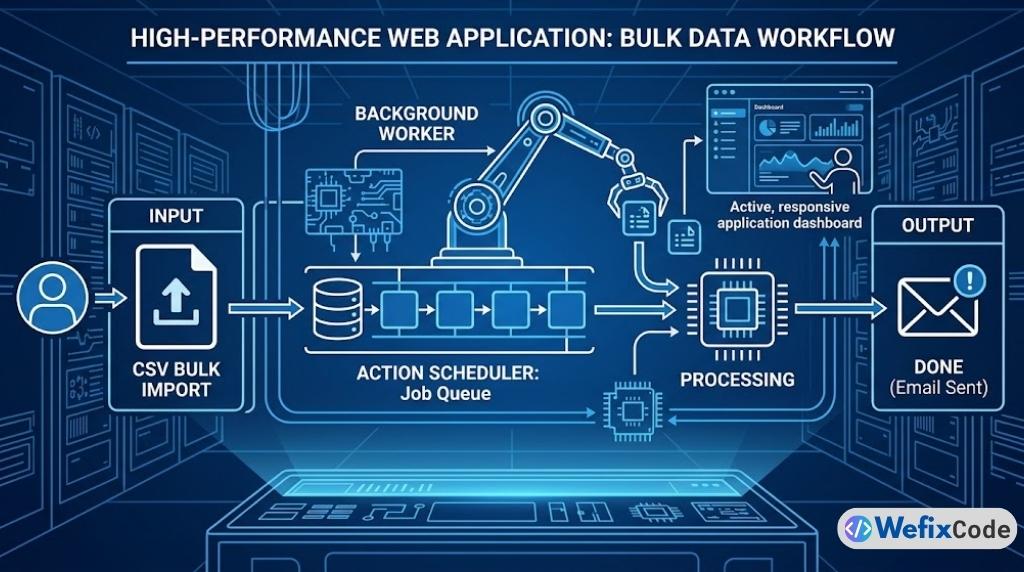
By offloading heavy calculations, API calls to third-party logistics providers, and report generation to the Action Scheduler, your application frontend remains lightning-fast and 100% responsive, regardless of the workload happening in the engine room.
Phase 6: Infrastructure & Security Hardening
A web application holds valuable customer data. A standard website getting hacked is embarrassing; a SaaS application getting hacked is a lawsuit.
As a Senior Developer, your security posture must shift from reactive to proactive.
1. Server-Side Fortification
You cannot rely on application-layer security plugins to protect SaaS data. As detailed in our Server Security Guide, you must implement strict .htaccess or Nginx rules to block unauthorized PHP execution and secure the WordPress REST API from brute-force botnets.
2. Object Caching (Redis/Memcached)
In a SaaS environment, database queries are expensive. While custom tables make them fast, running the same query 10,000 times a minute will still overload MySQL. You must implement a persistent object cache like Redis.
When a user’s dashboard requests their shipment data, WordPress will intercept the query, check the Redis memory RAM, and return the JSON payload in milliseconds without ever waking up the MySQL database.
3. Environment Isolation
Never build or test application code on the live server. You must employ a strict Local -> Staging -> Production deployment pipeline.
Use tools like WP-CLI to script database migrations and deployment protocols, ensuring that your custom SQL schemas (dbDelta) execute flawlessly during updates without risking data corruption.
Conclusion: Redefining WordPress
When engineered correctly, WordPress is not a limitation; it is an incredible accelerator.
By utilizing Custom SQL tables for data integrity, the REST API for decoupling, Granular Capabilities for security, and the Action Scheduler for background processing, you bypass thousands of hours of boilerplate coding. You don’t have to write your own authentication system, password reset logic, or routing architecture—WordPress provides the scaffolding.
The difference between a bloated website and a high-performance web application comes down to discipline. Keep your architecture clean, rely on server-side performance, and write code like an engineer.
Pingback: The 2026 WordPress Architecture Blueprint: Hybrid Headless, FSE, and AI-Optimized Performance - WeFixCode